
Offline-First Field Service App: Architecture, Options, and Build vs Buy
What happens when a technician is halfway through a critical repair, and the network suddenly disappears? The work order won’t load, inspection results can’t be saved, and the job remains open in the system. A lost connection can leave a completed repair undocumented and create extra work for the technician and office staff.
An offline field service app lets technicians access and update work orders, capture photos, and collect signatures without an internet connection. It stores information directly on the device and synchronizes it with the central FSM system when connectivity returns.
What Your Business Loses When a Field Service Technician App Goes Offline
Limited offline functionality creates operational problems that extend beyond a single service visit. When a field service technician app cannot reliably store job data, the consequences affect service costs, administrative workloads, billing, and customer relationships.

The most common business risks include:
- Repeat service visits. Incomplete inspection records or missing maintenance data may require another trip to the customer site, increasing travel costs and reducing technician availability.
- Lost photos and signatures. Without reliable local data storage, evidence of completed repairs, equipment conditions, or customer approval may disappear before reaching the central system.
- Manual data entry. Technicians may rely on paper forms or separate notes, leaving office staff to transfer information into the FSM system. This adds administrative work and increases the risk of errors.
- Delayed invoicing. Missing completion reports and service confirmations can prevent billing teams from processing invoices promptly, affecting cash flow.
- Customer disputes. Incomplete service histories make it harder to verify completed work, justify charges, or resolve disagreements over service quality.
These risks should be considered when evaluating mobile field service management software. Beyond supporting daily field operations, the application needs to preserve accurate service records and maintain a reliable flow of information between technicians and office teams.
Offline-Capable vs Offline-First: Four Levels of Offline Support
Offline support varies considerably between field service applications. To compare solutions, businesses can evaluate four common capability levels, from basic access to cached records to offline-first workflows with automatic synchronization and conflict handling.
| Level | What It Supports | Business Risk |
| 1. View-only cache | Technicians can view previously downloaded tasks and equipment details but cannot save changes. | Work must be documented later, increasing administrative effort and the risk of missing information. |
| 2. Offline forms | Technicians can complete forms without connectivity, but unsaved drafts may disappear when the app closes. | Interrupted sessions can result in lost inspection data and repeated work. |
| 3. Full local write | Work orders, photos, and updates are stored on the device, but technicians must manually initiate synchronization. | Forgotten uploads can delay reporting, billing, and office workflows. |
| 4. Offline-first with sync queue | The app saves changes locally and automatically synchronizes them when connectivity returns, with safeguards against duplicates and conflicting updates. | Poorly designed synchronization can still produce inconsistent records or require manual conflict resolution. |
When comparing FSM vendors or development partners, ask which level their solution actually supports. Request a demonstration covering network loss, app restarts, duplicate submissions, and conflicting updates. A working offline mode should be verified through real field scenarios, not feature descriptions alone.
Off-the-Shelf Offline Mode vs Custom: When Built-In Isn’t Enough
Many FSM platforms already include a field service app with offline mode, so building a custom offline field service app isn’t always necessary. The decision depends on whether built-in functionality covers your field workflows, data requirements, and connectivity conditions.
What Do Existing FSM Platforms Offer?
Microsoft Dynamics 365 Field Service supports offline-first mobile operations through configurable mobile offline profiles. Administrators define which records are downloaded and available offline, along with synchronization settings. Data outside the downloaded profile may require connectivity, while certain network-dependent features remain unavailable offline.
Salesforce Field Service supports offline data access through Briefcase configurations, but certain features have documented limitations. For example, some data types and Lightning Web Component behaviors require additional consideration when planning offline workflows.
When Is Built-In Offline Mode Enough?
Standard functionality may be sufficient when technicians follow conventional work-order processes, work without connectivity for relatively short periods, and need only the data supported by the configured offline profile. Before investing in development, test your actual workflows with the existing platform.
When Should You Consider Custom Development?
A custom application becomes more relevant when your business requires:
- Extended offline operations: Crews work for days or weeks without reliable connectivity.
- BLE or IoT integration: Technicians exchange data directly with equipment and sensors.
- Large local datasets: Teams need offline maps, technical drawings, photographs, or extensive asset documentation.
- Custom conflict resolution: Multiple technicians and dispatchers update the same records under specific business rules.
- Specialized workflows: Inspections involve industry-specific forms, calculations, approvals, or compliance checks.
- SaaS product differentiation: Your mobile application must support customer-specific processes as part of your FSM offering.
Is There a Middle Ground?
Yes. Instead of replacing your FSM platform, you can develop a custom mobile frontend connected to the existing FSM, CRM, or ERP through available integration interfaces.
This approach preserves established back-office processes while giving you more control over offline workflows, local storage, and synchronization. Integration capabilities and maintenance costs still need assessment.
If your crews regularly hit the limits of built-in offline mode, SCAND can develop a field service app that works offline while keeping your existing FSM platform as the central system for managing service operations.
Five Offline-First App Architecture Decisions That Drive Cost and Risk
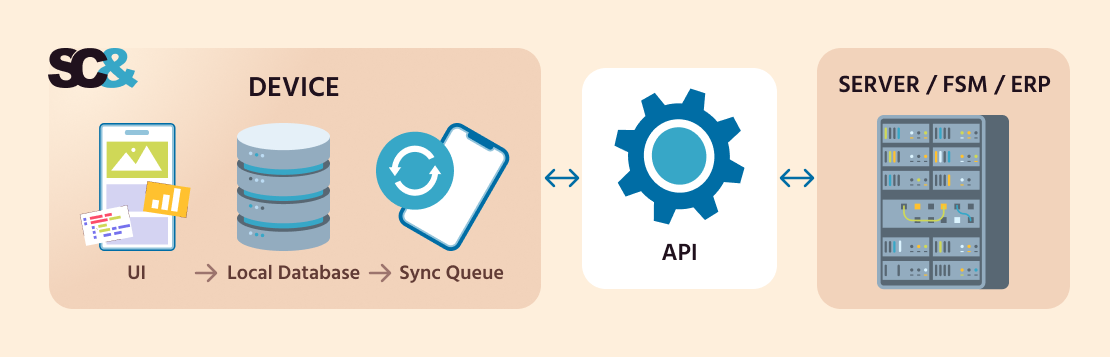
An offline-first mobile app’s architecture determines how much data technicians can access, what happens to unsent changes, and how the system recovers after connectivity returns. These decisions directly affect development costs, testing effort, and the risk of losing field records.
How Long Do Crews Need to Work Without a Signal?
An app designed for a two-hour network outage needs a different approach from one used by crews working offline for a week. Longer offline periods mean more local storage, larger datasets, and more complex synchronization. The business should define the maximum expected time without connectivity upfront, because underestimating it leads to costly rework once the app reaches real field conditions.
What Data Lives on the Device
Does every technician need the full asset history, or only today’s tasks? Local data may include work orders, checklists, maps, and equipment documentation, preloaded over Wi-Fi to reduce mobile data costs. Storing only what each role needs also limits security exposure, storage use, and synchronization time.
Who Wins in a Data Conflict
A technician edits a work order offline while a dispatcher updates it in the office. Which version should the system keep? Accepting every server update may erase field observations, while accepting every technician update may overwrite revised assignments.
Rules should reflect business priorities: complex rules require additional development and testing but can reduce the risk of conflicting records. Three common strategies are compared below.
| Strategy | Typical Data | Business Consideration |
| Server wins | Work order status, assignments | Central changes take priority; field updates may need review |
| Field-level merge | Notes, individual line items | Preserves independent changes but requires field-specific rules |
| Manual review | Charges, signatures, disputed records | Protects sensitive records but adds administrative work |
“Offline operations also affect how managers interpret service performance. A job completed at 2 PM might not reach the FSM system until the next morning. If reporting relies only on synchronization timestamps, completion times and technician productivity metrics can be misleading. The system needs to distinguish when work happened from when the data arrived.”
— Vitaly Tormanov, Head of Mobile Solutions at SCAND
Photos, Signatures, and Heavy Files
Photos, drawings, and signed documents require considerably more storage and bandwidth than text. A separate file queue lets the app send critical text updates first and compressed attachments afterward. The business also decides which files need original quality and how failed uploads are retried, which affects infrastructure costs and the reliability of service records.

Security of Offline Data
Business data stays on technicians’ devices, sometimes for long periods. Key decisions include device encryption, remote wipe when a phone is lost, and how long users can stay signed in without reconnecting. Stricter controls raise implementation and device management costs, but weak ones can expose customer and infrastructure records.
The mobile technology stack also affects local storage options, development effort, and maintenance costs:
| Technology | When to Choose It | Local Storage Options |
| Native Android / iOS | Deep device integration, demanding field workflows | Room (Android), Core Data (iOS) |
| Flutter | Offline-first apps for Android and iOS with substantial offline functionality | Drift, ObjectBox |
| React Native | Cross-platform apps with existing JavaScript/React expertise | WatermelonDB |
| PWA (offline-first web app) | Lightweight workflows accessible through a browser | IndexedDB |
An offline-first web app faces iOS limits on storage and background synchronization, so native or cross-platform apps usually suit crews that depend on offline work.
AI in an Offline Field Service App: What Runs on the Device and What Waits for Sync
AI can help technicians document repairs, identify equipment, and prepare reports even without internet access. However, an offline field service app must distinguish between tasks that can run locally and those requiring cloud processing. This choice affects device requirements, development costs, and reliability.
What AI Features Can Work Offline?
With suitable on-device models, technicians can:
- Convert voice notes into text without typing inspection details.
- Extract serial numbers and equipment labels from photographs using optical character recognition (OCR).
- Draft service reports from locally stored notes and job details.
- Suggest checklist steps based on available equipment information and inspection results.
Apple’s Foundation Models framework supports on-device language processing on compatible Apple Intelligence devices running iOS 26 or later. Google’s ML Kit GenAI APIs use Gemini Nano for tasks such as summarization, proofreading, rewriting, and image description on supported Android devices.
What AI Tasks Should Wait for Connectivity?
More computationally demanding tasks, such as detailed damage assessment, dispatch optimization, and insurance report generation, may be better handled in the cloud, depending on the available devices and AI models.

SCAND worked on TreeNinjaAI, an AI-powered storm recovery platform, featuring photo-based damage classification, preliminary work estimates, and insurance reporting reduced from days to minutes.
What Should Businesses Consider?
Before investing in offline AI, evaluate:
- Device compatibility: Existing technician phones may not support the required models.
- Human review: Technicians should confirm AI-generated findings before saving them.
- Battery and storage: Local inference and downloaded models increase device resource requirements.
For additional use cases, see how AI in field service management supports service operations beyond offline workflows.
How to Test a Field Service Technician App Offline Before You Sign Off
A field service technician app may perform well in a demo on stable Wi-Fi but behave differently on a remote job site. Before approving a vendor’s solution or accepting a custom application, test how it handles interruptions, unsent data, and conflicting updates.
Six Offline Test Scenarios
Run these scenarios during acceptance testing and check each result against the pass criterion.
| Scenario | What to Do | Pass If |
| Interrupted form | Enable airplane mode halfway through an inspection, then restart the app | All entered data is still there |
| 1–3 days offline | Create and update several work orders, then reconnect | Everything syncs with no duplicate records |
| Same record edited twice | Have a technician and a dispatcher change one work order independently | The agreed conflict rule is applied |
| 50+ photos offline | Capture the photos, then reconnect | All files upload, and text updates sync first |
| Weak connection | Test with unstable, low-speed connectivity | Failed uploads are retried without creating duplicate records |
| Sync status | Check what technicians see on screen | Changes are clearly shown as saved, pending, or synced |
Questions for the Vendor or Development Partner
Ask these questions alongside the tests:
- How are conflicting updates detected and resolved?
- Where is offline data stored, and how is it encrypted?
- What happens to unsent records if the app is reinstalled?
- How are failed synchronization attempts tracked and retried?
- Can administrators monitor synchronization failures across technicians’ devices?
Request a demonstration of these scenarios before signing off. A successful test should confirm that records remain accurate and recoverable even when connectivity is unreliable.
How SCAND Builds Offline-First Field Apps
Building an offline field service management app requires practical experience with unreliable connectivity, local data storage, and synchronization. SCAND has worked on these challenges across agriculture and field service projects. With 25+ years in software development, 250+ engineers, and 900+ completed projects, our team develops mobile solutions for demanding field environments.
Soil Sampling App: Reliable Data Collection in Remote Fields
An agricultural company needed a mobile app for operators collecting soil samples in areas with weak or unavailable cellular coverage. The solution also had to communicate with specialized sampling equipment and reduce errors in recording sample locations.
SCAND developed a cross-platform soil sampling app using Flutter, ObjectBox for local storage, and background synchronization through a secure API. Bluetooth Low Energy (BLE) connected the application to sampling equipment.
The result: AI-assisted route planning and optimized field zoning reduced operator travel time, making field operations up to 25% faster. Automated GPS tracking also helped eliminate manual coordinate entry errors. Collected data remained available offline and synchronized when connectivity returned.
Field Service Mobile App: Flexible Workflows Online and Offline
Another client needed a mobile solution for coordinating field technicians, managing service tasks, and collecting reports across different business activities. Customizable forms and reliable offline data processing were central requirements.
SCAND built a field service mobile app featuring online and offline data processing, smart synchronization of records and maps, encrypted local caching, dynamic forms, and electronic signatures.
The result: The application reduced time spent organizing and preparing service tasks and improved operational visibility. Flexible forms supported work orders, reports, invoices, and other service processes.
Frequently Asked Questions (FAQs)
Which field Service apps offer offline functionality?
Microsoft Dynamics 365 Field Service, Salesforce Field Service, and other FSM platforms support offline operations to varying degrees. Available features depend on data configuration, synchronization settings, and platform limitations. For teams working offline for extended periods or following specialized workflows, a custom mobile application may be a better fit.
What happens to a technician’s work if the signal drops mid-job?
In a properly designed offline-first app, technicians can continue working because changes are saved directly on the device. Work orders, inspection results, photos, and signatures remain available without connectivity. Once the connection returns, the application synchronizes pending updates with the central system, allowing office teams to access completed records.
How long can technicians work offline?
There is no universal limit. Some applications support short interruptions, while others are designed for several days or weeks without connectivity. The practical duration depends on local storage capacity, available work-order data, device resources, and synchronization design. Businesses should define the longest expected offline period before development begins.
Can you add offline mode to our existing field service app?
Yes, in many cases. Developers can add local data storage, offline workflows, and synchronization to an existing mobile application. The effort depends on its current architecture, backend APIs, and data dependencies. If major changes are required, building a new mobile frontend connected to the existing FSM platform may be more practical.
How do you prevent data conflicts between technicians and dispatchers?
Conflict resolution starts with defining which changes take priority. Central assignments may follow server-side rules, while independent notes can be merged. Sensitive records, such as charges or signatures, may require manual review. The application detects conflicting updates during synchronization and applies predefined rules to prevent accidental overwrites.
Can AI features work in an offline field service app?
Yes, partly. Speech-to-text, photo text recognition, and report summaries can run offline using on-device AI, such as Apple Foundation Models or Gemini Nano, on supported devices. More demanding tasks, including damage assessment and smart dispatching, require cloud processing once connectivity returns. Device compatibility should be checked before implementation.