How to Build a GPS App: A Step-by-Step Guide
Key takeaway: Before building a GPS app, define what it tracks or navigates, choose location sources (phone GPS or external trackers), add maps and geofencing, handle background location and battery use, and connect the app to a backend that stores and processes location data.
GPS apps are becoming important for businesses that need real-time visibility into vehicles, assets, and field operations. According to Grand View Research, the global GPS tracker market was valued at $4 billion in 2024 and is projected to reach $9.8 billion by 2030, with a compound annual growth rate of 17.4%.
However, GPS applications can serve various purposes, and when developing them, each company must consider a specific combination of factors, including technologies, overall requirements, development approaches, and enterprise integrations.
In this guide, we explore the essential features of GPS tracking apps, their architecture, the technologies involved, background location requirements for Android and iOS, AI-powered capabilities, no-code builders to make a GPS app without code, and the factors that influence development costs.
Types of GPS Apps
All GPS apps differ in how they use location data and what problems they solve. Some track the movement of vehicles, people, or assets, while others help users navigate routes or deliver services based on their location.
Understanding these differences is the first step in choosing the right features, architecture, and technologies for your application.
| Type | Example use | What it needs |
| GPS tracking apps | Fleet monitoring, delivery tracking, field technicians, and asset tracking | Location updates, trip history, geofencing, backend processing, and reporting |
| Navigation apps | Turn-by-turn directions, traffic-aware routing, and route planning | Maps, routing engines, traffic data, and real-time navigation |
| Location-based apps | Nearby services, location-triggered content, and local notifications | Location permissions, mapping, geofencing, and location-aware business logic |
Types of GPS Apps, Their Use Cases, and Core Requirements
Tracking apps collect location data over time and make it available to authorized users. For example, a field service app with GPS tracking can show where technicians are, record completed visits, and help dispatchers assign new jobs. Businesses may also connect these applications to fleet management software or field service management software.
Navigation apps calculate routes and provide directions. They may also account for traffic, road restrictions, and changes in travel conditions. Their routing and map-matching requirements, however, differ from those of a system that primarily records vehicle positions.
Location-based apps use a user’s position to trigger relevant content or actions. Examples include finding nearby businesses, displaying location-specific information, and sending notifications when users enter a defined area. Building these solutions often involves specialized location-based app development to integrate geolocation features with business logic.
Core Features of a GPS Tracking App
A GPS tracking application often needs more than a map and a moving location marker. Its features should help users interpret location data and take action. For example:

- Live map: Displays the current or most recently reported locations of tracked devices, along with movement and device status. Showing the timestamp of the last update helps users distinguish real-time positions from outdated location data.
- Trip history and playback: Records location data over time and reconstructs completed journeys for review. Filters by date, vehicle, user, or trip help teams investigate routes, verify visits, and analyze movement patterns.
- Geofences and alerts: Lets users define virtual boundaries around sites, warehouses, customer locations, or restricted areas. The system sends notifications when a tracked vehicle, person, or asset enters or leaves a designated zone, helping teams monitor activity and respond to exceptions.
- Driver and field staff mode: Gives employees tools to manage assigned tasks, update job statuses, upload photos, and confirm visits. By combining location data with these workflows, the app helps businesses coordinate field operations and track task progress.
- Offline queue: Stores location updates and user actions locally when a device loses connectivity. When the connection is restored, the app synchronizes the queued data with the backend, helping preserve trip records and updates.
- Admin panel and reports: Provides tools to manage users, devices, and access permissions, as well as review trip summaries, idle time, and other metrics. These reports help administrators monitor activity, find gaps, and make informed decisions.
- Integrations: Connects GPS tracking data with existing business systems, such as ERP, transportation management systems (TMS), CRM platforms, and dispatch tools. APIs and event-based integrations allow location updates and events to flow between systems, reducing manual work and keeping data uniform.
In case you need an MVP, prioritize live location, trip history, basic geofencing, user permissions, and an administrative interface. Add advanced reporting and integrations when the core tracking workflow has been properly tested.
How a GPS Tracking App Works
Understanding the architecture is essential when planning how to build a GPS tracking app. A typical system has five layers.
- Location source. A smartphone obtains location data through its positioning services. Alternatively, a dedicated GPS tracker records coordinates and may also report speed, ignition state, battery level, or other telemetry.
- Communication. The device transmits updates over a mobile network such as LTE or, where appropriate, NB-IoT. Depending on the device and system design, communication may use HTTPS, MQTT, TCP, or UDP.
- Backend processing. The server authenticates incoming data, parses device-specific protocols, validates coordinates, handles duplicate messages, and derives events such as trips, stops, and geofence transitions.
- Storage. A database stores device metadata, location history, events, and user information. PostgreSQL with PostGIS is one option for geospatial queries; time-series storage can also help when location data volume is high.
- Applications and APIs. Mobile apps, web dashboards, and external systems retrieve processed data. Notification services can deliver alerts when defined conditions occur.
A simplified data flow looks like this:
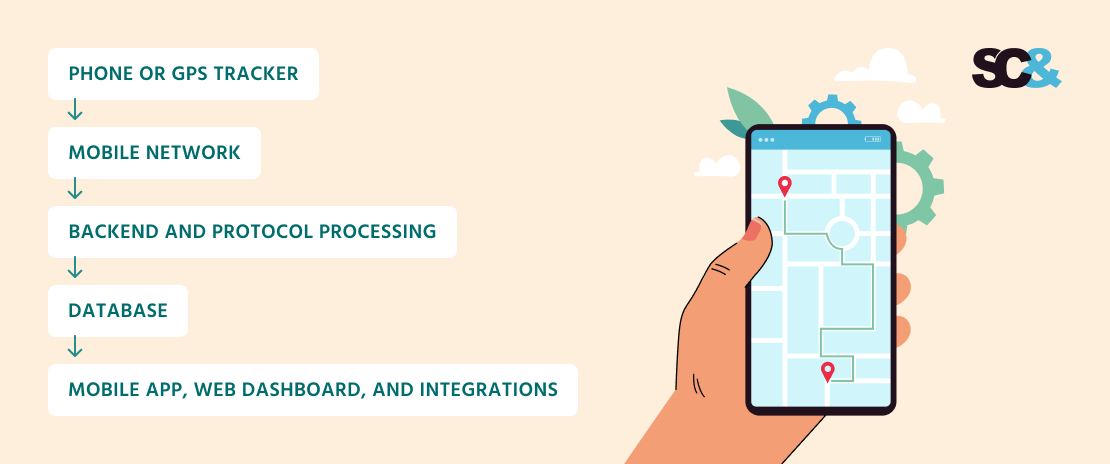
The backend is responsible for more than forwarding coordinates. It must handle intermittent connectivity, different reporting intervals, device identity, access control, and historical queries without compromising data integrity.
GPS accuracy also depends on the environment. According to GPS.gov, GPS-enabled smartphones are typically accurate to within a 4.9-meter (16-foot) radius under open sky.
Accuracy can deteriorate near buildings, bridges, trees, and indoors. An application should account for these limitations rather than treating every reported coordinate as exact.
How to Build a GPS App Step by Step
Developing a GPS app requires a structured strategy, from defining the product’s purpose and selecting the right technologies to implementing core features and validating location accuracy. The following steps outline how to turn your requirements into a GPS application.
1. Define What You Track and How Often
Start by identifying the tracked objects: vehicles, field employees, deliveries, equipment, or personal devices. Specify who can view each object, how long location history must be retained, and which events matter to the business.
Next, define the required update frequency. A dispatcher monitoring vehicles in motion may need frequent updates, while an asset management application may only need occasional position reports. Consider whether the application must track continuously, only during a work shift, or only after a user starts a task.
Frequent updates increase network traffic, battery consumption, storage requirements, and backend processing load. They can also produce more noisy data without improving decisions.
Common mistake: Requesting a location update every second for every device without a clear use case. Set reporting rules according to movement, requirements, and acceptable latency.
2. Choose Location Sources: Phone or GPS Tracker
Choose between a smartphone, a dedicated GPS tracker, or a combination of both. A smartphone is practical when users already carry devices and need a mobile workflow.
It provides location services, a user interface, and access to job information through one device. However, background restrictions, battery use, permission changes, and device availability can affect tracking continuity.
Dedicated trackers are better suited to many fleet and asset monitoring scenarios. Devices from manufacturers such as Teltonika, Queclink, and Ruptela may support ignition detection, external sensors, and configurable reporting. Their protocol compatibility and hardware capabilities must be verified before integration.
A hybrid architecture can use a mobile app for field employees and dedicated trackers for vehicles or equipment.
Common mistake: Selecting hardware based only on price. Verify supported protocols, network compatibility, power requirements, reporting behavior, and firmware update options before committing to a device.
3. Pick Native or Cross-Platform Development
Native development with Swift for iOS and Kotlin for Android offers direct access to platform-specific location APIs and lifecycle controls. It can be useful when background tracking behavior, device integration, or platform-specific optimization is especially important.
Cross-platform frameworks such as Flutter, Kotlin Multiplatform, and React Native can share much of the user interface and application logic. They may reduce duplicated development effort when the product supports both platforms, although native modules may still be necessary for some device-specific functionality.
The choice should follow technical requirements rather than a general assumption that one approach is always faster or better.
Common mistake: Evaluating frameworks only by how quickly they can render a map. For tracking applications, location collection, background execution, offline synchronization, and battery management are equally important.
4. Add Maps and Geofencing
Choose a mapping provider according to geographic coverage, routing requirements, licensing, and expected usage. Google Maps SDK, Mapbox, and OpenStreetMap-based solutions are common options, but their services and commercial terms differ.

Displaying a map is only one part of the implementation. You may also need address search, route visualization, map matching, distance calculations, and geofence management. If you use a hosted map or routing API, review request limits, attribution requirements, caching restrictions, and pricing before launch.
Geofences can be evaluated on the device or on the server. Server-side evaluation is often useful when several users must receive consistent alerts for the same tracked object. Mobile operating systems may also impose constraints on region monitoring and background execution.
Common mistake: Treating a map provider as a complete tracking backend. Maps visualize and sometimes process geographic information, but your system still needs to collect, validate, store, and authorize access to tracking data.
5. Build the Backend
The backend receives location updates, identifies devices, processes incoming messages, and exposes the results through APIs. It should also manage users, permissions, device configuration, historical data, geofences, alerts, and integrations.
If you are planning how to build a GPS tracking system, start with a clear data model. Store timestamps, coordinates, accuracy estimates, device identifiers, and relevant telemetry. Separate raw incoming messages from normalized location records when preserving the original payload helps with diagnostics or future protocol changes.
To develop GPS tracking software that can scale, introduce queues or streaming infrastructure where needed, apply idempotent processing, and partition historical data according to actual workload. Filter implausible jumps carefully without discarding legitimate movement.
Common mistake: Building the entire backend around the first tracker model. Use a normalized internal data model and isolate protocol-specific logic to make future hardware integrations easier. Open-source servers such as Traccar already support more than 200 protocols and 2,000+ device models under the Apache 2.0 license.
6. Handle Background Location and Battery
Determine when tracking must continue after a user switches apps or locks the phone. Implement the relevant Android and iOS permissions, background execution settings, and recovery logic.
Use adaptive sampling rather than continuous high-frequency updates everywhere. Buffer points locally when connectivity fails and upload them in batches when possible. See the dedicated background location section below.
Common mistake: Assuming a location service will run indefinitely because it works while the app is open. Operating systems may suspend applications, users can revoke permissions, and power-saving modes can change execution behavior.
7. Test in the Field
Test the application on real devices and across different routes, network conditions, and operating-system versions. Include open roads, dense urban areas, parking garages, tunnels, weak cellular coverage, and prolonged background operation.
Verify that the system handles duplicate messages, delayed uploads, out-of-order points, device restarts, permission changes, and incorrect device clocks. Compare the recorded trip against known route segments and investigate implausible jumps.
Common mistake: Relying entirely on simulators and short indoor tests. A tracking app can appear reliable in development and fail during an eight-hour shift or a long journey with intermittent connectivity.
8. Launch and Scale
Release the mobile applications, deploy the backend, configure monitoring, and establish procedures for responding to failed updates and service interruptions.
Track metrics such as location-update latency, the percentage of expected updates received, synchronization failures, battery consumption, API response times, and notification delivery.
Load-test realistic device counts and reporting frequencies rather than relying on a generic estimate of concurrent users. Start with a controlled rollout, verify operational behavior, and expand gradually.
Common mistake: Scaling based only on the number of registered devices. Backend load also depends on reporting frequency, event volume, data-retention periods, and the number of users querying location data. Experienced teams can help address these challenges through GPS tracking software development, from backend architecture and performance testing to production deployment.
Background Location on Android and iOS
Background location is one of the most technically demanding parts of mobile tracking. The operating system controls when applications can access location services and execute work, so a reliable implementation must account for permissions, lifecycle changes, and battery limits.

Android
If you are planning to build a GPS app for Android, start with permissions: on Android 10 and later, apps that access location while running in the background may need the ACCESS_BACKGROUND_LOCATION permission. For continuous, user-visible tracking, a location foreground service may also be appropriate, depending on the use case and applicable platform requirements.
Because users can change location permissions at any time, check access before collecting data and make sure tracking handles revoked or limited permissions gracefully. Clearly explain why background access is needed and request it only when the feature requires it.
iOS
On iOS, background tracking requires an appropriate Core Location configuration and authorization. Depending on the use case, the app may need the Location updates background mode and an appropriate authorization level, including Always authorization when justified.
Apple may suspend background applications, and location updates can be queued until the system delivers them. Choose the appropriate Core Location service for the task: continuous updates may be justified for active navigation or a work shift, while significant-change monitoring may suit less frequent location awareness.
Battery and Synchronization
Battery use depends on sampling frequency, GPS activity, network conditions, and device hardware. Reduce unnecessary updates when the device is stationary, adapt sampling to the tracking scenario, and batch network transfers where latency requirements permit.
Maintain a local queue for offline operation, attach reliable timestamps and sequence identifiers where available, and synchronize records safely after reconnection. The mobile app should clearly indicate when tracking is paused or permissions are insufficient.
For specialist mobile app development, these platform constraints should be addressed during architecture design rather than left until testing.
Build from Scratch or Use Traccar, Wialon, or flespi?
Existing GPS tracking platforms can help accelerate development, especially when you need basic device connectivity and location monitoring. However, if you are building a product around specific business processes, custom development offers greater flexibility and control over how the entire solution works.
| Option | Best for | Limits |
| Open-source server, such as Traccar | Teams that need control over hosting and want to reuse existing protocol support | Requires deployment, maintenance, security configuration, and customization |
| SaaS platform, such as Wialon or flespi | Teams that want managed infrastructure or existing device connectivity | Depends on provider capabilities, commercial terms, integration options, and data policies |
| Custom platform | Products with specialized workflows, complex integrations, or strict architectural requirements | Requires more engineering effort, testing, and long-term maintenance |
GPS Tracking Platform Options: Use Cases and Limitations
Traccar provides a starting point for receiving data from supported GPS trackers and accessing tracking information through APIs. Wialon and flespi offer alternative platform capabilities, but their suitability depends on supported hardware, integration options, pricing, and data-access terms.
Overall, these platforms can reduce development effort, but their existing features and architecture may not align fully with your product requirements.
Custom development lets you design the platform around your business rather than adapting your business to an existing platform. You can define your own tracking logic, build tailored dashboards and reports, integrate directly with internal systems, and choose an architecture that supports your long-term product strategy.
It also gives you more freedom to evolve features without depending entirely on a third-party provider’s roadmap or commercial terms.
A hybrid approach is also worth considering. For example, you could use Traccar or a managed service for device connectivity while developing custom mobile apps, business logic, reporting, and integrations. This can shorten time to market without sacrificing control over the features that differentiate your product.
Ultimately, the right choice depends on your goals. If your needs are standard and time to market is the priority, an existing platform may be sufficient. If GPS tracking is central to your product and you need a solution tailored to your workflows, investing in custom development can provide a stronger foundation for long-term differentiation and control.
Do You Need Your Own GPS Tracking Device?
Most GPS tracking applications do not require custom hardware. A compatible commercial tracker is usually the simplest option when the goal is to monitor vehicles, equipment, or other assets.
If you are researching how to make a GPS tracking device, how to build a GPS tracking device for a specific vehicle, or simply how to create a GPS tracker or a GPS locator for a pilot, begin by defining the physical requirements. Consider size, battery life, connectivity, installation method, environmental conditions, sensor inputs, and reporting frequency.
Commercial devices may already provide positioning, cellular communication, configurable reporting, and a documented protocol. Before purchasing them in volume, verify that the backend or integration platform supports their exact model and firmware.
Custom hardware can make sense when the product requires a specialized form factor, unusual sensors, unique power-management behavior, or economics that justify a larger production run.
However, designing a device involves more than adding a GPS module: it may require electronics, firmware, enclosure design, connectivity testing, manufacturing preparation, and regulatory certification.
For an initial prototype, a GPS tracker development kit can help validate positioning and communication before committing to custom hardware. A GPS tracker for developers may also provide an API or SDK that simplifies integration.
If the project requires proprietary hardware, consider specialist firmware development and embedded software development.
AI GPS Tracking: What AI Adds to a Tracking App
AI GPS tracking turns historical location data into predictions and recommendations, and our AI development services help build these features. But its value depends on data quality, business context, and whether the results improve a measurable business outcome.

- ETA prediction: Models can estimate arrival times from historical trips, current traffic, time of day, and other relevant signals. This can outperform a simple distance-divided-by-speed estimate when sufficient representative data is available.
- Route and dispatch optimization: AI route optimization and AI dispatch can help assign deliveries or service jobs based on location, workload, time windows, and constraints. AI route planning and AI routing should complement a routing engine and business rules, not replace them blindly.
- Anomaly detection: Models or statistical rules can flag unusual routes, unexpected stops, nighttime movement, or patterns that may indicate theft or tracker malfunction. An alert should trigger investigation, not automatically be treated as proof of an incident.
- Driver behavior scoring: With suitable telematics and, where appropriate, video data, systems can identify harsh braking, speeding, and other driving patterns. The reliability of these assessments depends on sensor quality and context.
- AI assistant for dispatchers: A language-model interface can let authorized users ask questions such as, “Which vehicles were idle for more than an hour today?” The system must translate questions into controlled queries and enforce the same access permissions as the underlying application.
The main thing here is that AI works best when it has accurate historical data to learn from. Before using AI, remove obvious GPS errors, keep timestamps uniform, and make sure past events are correctly recorded.
Start with simple rules, such as alerts when a vehicle leaves a designated area or exceeds a speed limit. Once you have enough data, you can introduce machine learning to predict delays, detect unusual behavior, or identify maintenance needs.
The same approach scales to AI fleet management, where these models run across hundreds of vehicles and feed dispatch and maintenance planning.
Common Pitfalls When Building a GPS App
Even when a GPS application works as expected during initial testing, there are several technical and operational challenges that can affect its stability in real-world conditions.
- GPS drift and position jumps: Location data can become inaccurate due to weak satellite signals, indoor environments, or interference, causing devices to appear to move unexpectedly. To reduce these errors, validate location updates using accuracy estimates, timestamps, and plausible movement speeds.
- Incorrect timestamps and time zones: Inconsistent device clocks and time-zone handling can make trips appear out of order or show incorrect departure and arrival times. Store timestamps in UTC, record when the server receives each update, and convert times to local time only when displaying or reporting them.
- Duplicate or out-of-order updates: Network interruptions can cause devices to resend stored location points or deliver them in a different order. Use unique message identifiers or deduplication rules to prevent repeated records, and organize trip histories by event timestamps rather than message arrival order.
- Growing data volume: Frequent location updates can quickly increase storage requirements and slow down queries and reports. To overcome this problem, set appropriate data-retention policies and optimize database indexing, partitioning, and aggregation.
- Employee privacy: Continuous location tracking can expose sensitive information about employees’ movements and routines. To solve this problem, clearly communicate tracking practices, collect only the data necessary for the intended purpose, restrict access, and establish appropriate retention policies.
- Vendor and protocol lock-in: Depending heavily on one hardware vendor or proprietary protocol can make it difficult to change devices or integrate new systems later. Reduce this dependency by documenting supported protocols, isolating device-specific integrations, and using a consistent internal data model that allows new hardware to be integrated with minimal changes.
How Much Does It Cost to Build a GPS App?
The cost to build a GPS app generally depends on its features, platform coverage, device ecosystem, and operational requirements. This way, there is no meaningful universal estimate without defining the scope. The main cost drivers include:
- Platforms: iOS, Android, web dashboards, and administrative interfaces require different implementation and testing efforts.
- Location collection: Background tracking, offline synchronization, adaptive sampling, and battery optimization add complexity.
- Hardware and protocols: Supporting multiple tracker manufacturers or proprietary protocols increases integration and testing work.
- Maps and routing: Paid APIs, geocoding, traffic data, and routing services may introduce recurring usage charges.
- Backend and storage: Device volume, update frequency, history retention, reporting, and availability requirements affect infrastructure and engineering needs.
- Integrations and analytics: ERP, TMS, CRM, custom reports, predictive models, and automated dispatch workflows expand the scope.
- Security and maintenance: Access control, monitoring, updates, compatibility testing, and privacy requirements continue after launch.
To control the initial scope, build an MVP with one primary tracking source, a live map, trip history, basic geofencing, and the minimum required administrative tools. Validate the workflow and data quality before adding more platforms, tracker models, or advanced analytics.
How SCAND Can Help
Building a GPS tracking application requires coordination between mobile engineering, backend development, device integration, and operational workflows. SCAND has more than 25 years of software development experience and has delivered 900+ projects.
One example is our Field Service App project, in which we developed a mobile solution that displayed field staff locations on Google Maps and linked them to assigned tasks and completion statuses. This project demonstrates how location tracking can support everyday business operations and improve field team coordination.
Drawing on this experience, SCAND can help you define your MVP, choose the right architecture, integrate mobile location services or external GPS trackers, develop the backend, and test the application under real-world conditions.
Frequently Asked Questions (FAQs)
How do I make a GPS app without coding?
No-code tools can build simple GPS apps with maps, location pins, and basic workflows. Advanced background tracking, custom hardware support, offline synchronization, and complex integrations may require custom development.
Can a phone replace a GPS tracker?
Yes, smartphones can replace dedicated trackers when users grant location permissions and keep devices charged. Dedicated trackers are often better for permanent vehicle installations, telemetry, and monitoring assets without relying on users’ phones.
How accurate is GPS tracking in a mobile app?
Smartphones can achieve around 4.9-meter (16-foot) accuracy under open skies. Buildings, interference, and urban environments can reduce accuracy, so apps should account for location uncertainty.
How do GPS apps work in the background without draining the battery?
Apps can reduce battery consumption by adjusting location-update frequency, batching network requests, and buffering data offline. However, continuous tracking still consumes power, and operating systems may delay updates.
Is it better to use Traccar or build custom GPS software?
Traccar suits projects whose tracking needs match its existing features and device support. Custom development offers greater flexibility for specialized workflows, integrations, and user experiences, while hybrid solutions can combine both approaches.
How does AI GPS tracking work?
AI analyzes location history and operational data to predict arrival times, detect unusual movement, and optimize routes or assignments. Reliable results require accurate historical data and clear objectives.