How to Build Machine Learning Apps: A Complete Guide for 2026
Machine learning app development helps businesses build software that can recognize patterns, make predictions, personalize user experiences, and automate complex tasks.
Today, these capabilities can come from custom-trained machine learning (ML) models, pre-trained models accessed through APIs, and large language models (LLMs) that generate text, code, images, and other content. Some models can also run directly on a smartphone, reducing latency and the need to send data to the cloud.
The right approach depends on your business goals, available data, and its volume, privacy requirements, and budget.
In this guide, we explain how to create a machine learning app, choose the right AI model, integrate it into a product, estimate development costs, and maintain the solution after launch. We also cover on-device ML, generative AI, and the development practices that help keep ML applications reliable.
What is Machine Learning?
Machine learning (ML) is a branch of artificial intelligence (AI) in which models learn patterns from data and use them to make predictions or decisions without being explicitly programmed with rules for every situation.

Instead of manually defining every possible outcome, developers train a model on examples so it can recognize relationships, patterns and apply what it has learned to new data.
For example, a model trained on historical sales data can forecast future demand. Another model can identify suspicious transactions, recognize objects in images, or recommend products based on customer behavior.
Machine learning is not a single technique. It includes different approaches suited to different problems, from straightforward numerical predictions to complex language and image processing tasks. Deep learning, which uses neural networks with multiple layers, is one of its subfields.
Types of Machine Learning
Machine learning approaches are commonly grouped into several categories, depending on how models learn from data. The main types include supervised, unsupervised, semi-supervised, reinforcement, and self-supervised learning. Google Cloud’s machine learning overview provides additional background on these approaches.
- Supervised learning uses labeled datasets, in which examples are paired with known outcomes. A model learns to map inputs to outputs. For example, an email-filtering system can learn to classify messages as spam or legitimate.
- Unsupervised learning works with unlabeled data to discover patterns, similarities, or groups. A retailer might use it to segment customers based on purchasing behavior.
- Semi-supervised learning combines a small amount of labeled data with a larger amount of unlabeled data. It can be useful when manually labeling a dataset is expensive or time-consuming.
- Reinforcement learning trains an agent to choose actions through interaction with an environment and feedback in the form of rewards or penalties. It can be applied to robotics, simulations, and certain optimization problems.
- Self-supervised learning allows a model to learn from data by generating training signals from the data itself rather than relying entirely on human-labeled examples. It is an important foundation for many modern language models, which learn patterns in text before being adapted to specific tasks.
What is a Machine Learning App?
A machine learning app, in turn, is a type of app that can learn from data and improve over time without being programmed with rules for every situation. Instead of just following what it’s told, it learns from patterns in the data and makes its own decisions or forecasts.
As opposed to regular apps that always react exactly the same way, machine learning apps are able to change and improve as they gain more knowledge.
Major characteristics of ML apps:
- Data-Driven Action: The app makes use of previous or existing information to function and improve.
- Flexibility: ML models mature as more data is given to them.
- Predictive Capability: The app forecasts outcomes, user behaviors, or tendencies.
- Automation: Many decision-making processes are automated without human involvement.
Popular examples:
- Netflix or YouTube: Recommending videos based on your history of viewing.
- Google Maps: Predicting traffic conditions and offering the best routes.
- Grammarly: Detecting grammar and style issues via NLP (Natural Language Processing).
- Face ID: Recognizing users through deep learning-based facial recognition.
- Generative AI assistants, which use large language models to answer questions, summarize documents, draft text, recommend or perform next actions, and support conversational interactions.
| Feature | ML Apps | Traditional Apps |
| Logic | Learn from data | Follow fixed rules |
| Adaptability | Improve over time | Stay the same unless updated |
| Personalization | High – tailored to users | Low – same for all users |
| Decision-making | Predict and adapt | Pre-programmed only |
| Maintenance | Needs data updates | Needs code updates |
| Examples | Netflix, Siri, Face ID | Calculator, notepad, contact form |
Machine Learning vs Traditional (Rule-Based) Apps
Why Build a Machine-Learning App?
Creating an app with machine learning enables companies to intellectualize software and make it more useful and personalized for users.
Instead of being the same for everyone, ML apps can learn from information and modify their behavior to accommodate individual requirements or make better decisions. The major reasons to use machine learning in your app are listed below:
- Personalization: ML assists apps in suggesting content, products, or features to users based on their preferences and behavior, for instance, recommendations of shows according to a taste by Netflix.
- Automation: ML can automate such complex tasks as customer support, data analysis, or even problem diagnosis.
- Predictions: ML models can examine past data and predict future behavior or outcomes. Example: Prediction by e-commerce apps of what a user will buy next.
- Advanced Usability Features: By learning from user action, ML apps are able to respond more intelligently and more relevantly. For example, keyboard apps learn your typing patterns and make more precise word suggestions.
- Competitive differentiation: Useful AI features can help a product stand out and give users reasons to return.
- Continuous improvement: When appropriate, new data and user feedback can help teams retrain or refine models. More data alone does not guarantee better results, so quality and monitoring remain important.
In essence, machine learning makes applications possible that do more than simply function but are also intelligent — able to learn, anticipate requirements, and deliver a better overall experience.
Industry Applications of Machine Learning Apps
Machine learning has practical applications across industries because it can identify patterns in large datasets, automate repetitive work, and support better-informed decisions.
- Healthcare: ML models can help clinicians analyze medical images, identify patterns in patient records, and prioritize cases for further review. For example, image-analysis models can assist in detecting suspicious skin lesions. These tools must be properly validated and should not replace qualified medical judgment.
- Finance: Banks and financial services companies use ML to detect unusual/fraud transactions, assess risk, and identify potentially fraudulent activity.
- E-commerce and retail: ML for e-commerce helps retailers personalize product recommendations, forecast demand, optimize inventory, and identify patterns in customer behavior. Generative AI can also support product discovery and customer service.
- Logistics and transportation: ML models can help optimize delivery routes, forecast arrival times, estimate maintenance needs, and respond to changing traffic or weather conditions.
- Media and entertainment: Music and video platforms use recommendation systems to match users with content based on their interests and interactions.
- Manufacturing: Predictive maintenance models can identify patterns associated with equipment failure, while computer vision can help detect defects on production lines.
- Real estate: ML can help estimate property values, match buyers with suitable listings, and analyze market trends.
- Sports: ML models can help detect faults, analyze game performance, and track key game metrics in real time.
How to Create a Machine Learning App: Step by Step
Creating an application based on machine learning is a really difficult task, requiring detailed planning, at least a minimal understanding of how and what will work, calculation of payback and feasibility, etc.
However, it is important here that in general, this process is not chaotic, but quite consistent and manageable if you break it down into clear steps.
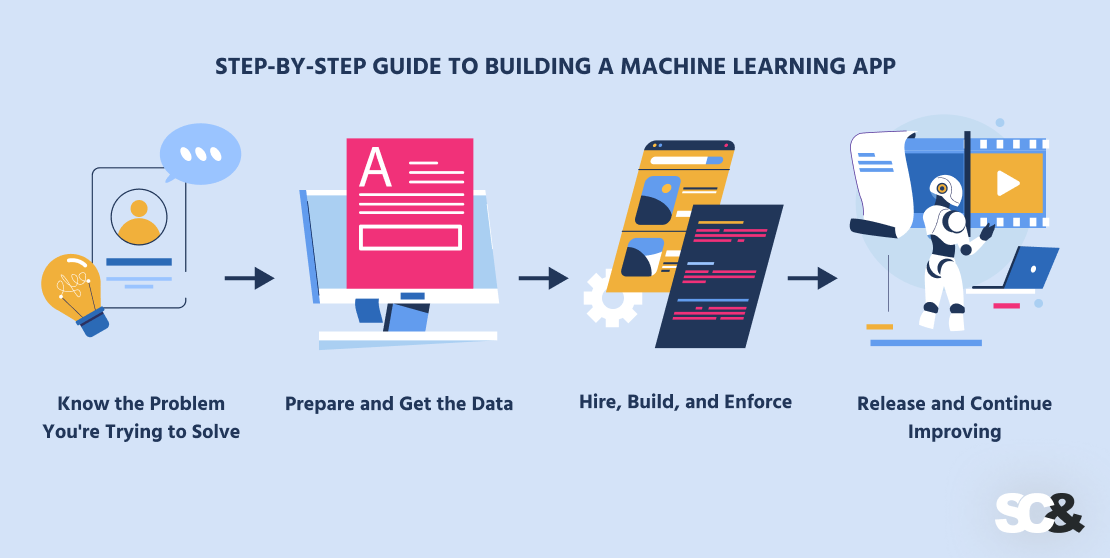
Step 1: Know the Problem You’re Trying to Solve
Before anything else, clarify exactly what you’re trying to get your app to do and why machine learning is the optimal solution for it.
Ask yourself:
- What is the problem we’re solving?
- Can machine learning do a better job of it than a normal app?
Example: You want to create a shopping app that recommends products based on what someone likes. That’s a perfect use of machine learning.
Step 2: Prepare and Get the Data
Machine learning apps learn from data, and as such, you will need good-quality data to start with:
- Collect data – gather details from your application, users, APIs, or public sources.
- Clean it up– remove errors, duplicates, and missing values.
- Get it ready – convert it to numbers if necessary and divide it into training and testing sets.
For example, let’s say you’re creating a fitness app that recommends workouts. Your data could be age, weight, goals, and previous workouts.
Step 3: Choose Your Approach: Custom Model, Pre-Trained Model, or LLM
One of the most important decisions in AI model development is whether to train a model, adapt an existing one, or use a model provided by an external service. The right choice depends on the task, the available data, the required accuracy, privacy constraints, time-to-market, and the total cost of ownership.
- Option 1: Build a custom ML model. This approach makes sense when the application needs predictions based on proprietary data or a business-specific task, such as demand forecasting, defect detection, or customer churn prediction. The team controls the training process and can adapt the model to the use case, but it must account for data preparation, training, evaluation, and ongoing maintenance. Thing to remember: lots of data — training is longer and more expensive.
- Option 2: Use a pre-trained model or an API. Pre-trained models have already learned general patterns from large datasets. A provider API allows the application to use a model without managing its underlying infrastructure. This is often a practical starting point for text generation, summarization, image analysis, transcription, and conversational features. It’s cheaper and faster to start with a service and think later if you need your own private model.
- Option 3: Use an LLM with retrieval-augmented generation (RAG). RAG connects a language model to a knowledge source, retrieves relevant information for a query, and supplies that information as context for the answer. It is useful when an application needs to answer questions about internal documents, product catalogs, policies, or frequently changing information. RAG does not retrain the model; it gives the model relevant, grounded information at response time.
- Option 4: Fine-tune an existing model. Fine-tuning continues training a pre-trained model on carefully selected examples to adapt its behavior to a specific task, format, or domain. It may be useful when prompt design alone does not produce consistent enough results. It is not always the best way to add factual knowledge that changes frequently; RAG may be more appropriate for that purpose. But if you do not deal with text tasks, post training, fine-tuning your own version of the initial model is quicker and cheaper. And it’s more accurate, because it fits your data.
- Option 5: Use a private or self-hosted model. If business or regulatory requirements limit sending data to an external API, the team can evaluate a model deployed in a controlled environment. Depending on the use case, a private LLM may run in a company’s cloud environment or on its own infrastructure. This approach gives the organization more control but also introduces hosting, security, scaling, and maintenance responsibilities.
| Approach | Best suited for | Main advantages | Main trade-offs |
| Custom ML model | Specific predictions using business data | Tailored behavior and greater control | Requires suitable data, expertise, and model maintenance |
| Pre-trained model API | Common AI capabilities and rapid prototyping | Faster implementation and less infrastructure management | Usage fees, provider dependency, and data-handling considerations |
| LLM with RAG | Answers grounded in company or domain knowledge | Knowledge can be updated without retraining the LLM | Requires retrieval quality, access controls, and source management |
| Fine-tuned model | Consistent behavior on a specialized task | Can improve task-specific output patterns | Needs quality examples, evaluation, and additional training work |
| Private or self-hosted model | Sensitive workloads or greater deployment control | More control over infrastructure and data flows | Infrastructure, security, and operational costs |
Comparison of AI Development Approaches
Step 4: Build and Integrate the Model
Usually, there are two paths to follow: employ an internal product team (if there is none) or entrust the project to external software developers.
If creating your own tech department is not in your plans and budget, then hiring a professional company to create a machine learning application is the most suitable solution to save you time, money, and a lot of stress.
1. Choose the Best Model for Your App
They’ll look at your idea and decide which type of machine learning model fits best. For example:
- Classification – for sorting things into categories, like spam vs. not spam.
- Regression – for predicting numbers, like future sales.
- Clustering – for grouping users or products into types.
- Deep learning – for more complex tasks like face recognition or speech analysis.
If they’re unsure which is best at the start, they’ll test a few simple models first.
2. Train and Test the Model
Once the model is chosen, the developers will “train” it using your data—basically teaching it how to make good decisions.
They’ll:
- Use part of the data to train the model.
- Use the rest to test how well it performs.
- Check its accuracy and improve it if needed.
If it doesn’t work well, they’ll clean up the data, change the model, or try new techniques.
3. Add the Model to Your App
After testing, the model must be connected to the application. Developers can:
- Build an API that lets the application send input to a model and receive its output, in a one-shot or batched way.
- Deploy the model on a cloud platform such as AWS, Google Cloud, or Microsoft Azure.
- Use a third-party model API when it meets the application’s privacy, performance, and cost requirements.
- Embed a compatible model directly into a mobile or desktop application for on-device inference.
For example, a photo-editing application could run an image-segmentation model locally to remove backgrounds without sending every image to a remote server.

The architecture can also be hybrid: lightweight or privacy-sensitive tasks run on the device, while more demanding operations are handled by a cloud model. The choice should reflect actual performance and privacy requirements rather than assuming that every feature needs a cloud connection.
4. Build a Simple and Friendly Interface
No matter how smart the model is, people still need a clear and easy way to use your app. The team will design the app’s interface—what the user sees and taps on—and connect it to the machine learning model behind the scenes.
They’ll use:
- Tools like Flutter, Swift, or Kotlin to build mobile apps.
- Web tools like React or Vue for browser-based apps.
- Back-end tools to handle communication between the app and the model.
Step 5: Release and Continue Improving
Now it’s time to release your app but your job isn’t done yet. Machine learning apps require continuous updates to remain accurate.
Following release, monitor:
- How the model is performing.
- Whether users find and use the ML features.
- If the app requires new training data as circumstances evolve.
This way, your app will learn and get better all the while, as users would anticipate.
On-Device Machine Learning for Mobile Apps
On-device machine learning runs a model directly on a phone or another user device instead of sending every request to a remote server.
Such an approach can reduce response times, support selected features offline, and keep sensitive input on the device. It can also lower cloud inference costs, although developers must still account for device compatibility, battery use, memory limits, and model updates.
For iOS applications, Core ML provides the framework for integrating and running ML models on Apple devices. Create ML helps developers train models for supported tasks and prepare them for use in apps.
For Android, ML Kit offers ready-to-use machine learning capabilities, while LiteRT is Google’s runtime for on-device model inference. ONNX Runtime Mobile is another option for running compatible ONNX models on iOS and Android. The right tool depends on the model, device support, and required functionality.
Language models can also run locally on supported devices. Apple’s Foundation Models framework provides access to on-device language-model capabilities on supported Apple platforms, while Android AICore supports system-level AI features, including Gemini Nano on compatible devices.
Availability and capabilities depend on the operating system, hardware, and supported APIs. For a deeper discussion of local language models, see our guide to on-device LLMs.
Technologies and Tools Needed for ML App Development
The grade of the software product being developed always directly depends upon the technologies used.

Modern, time-tested tech guarantees resilience of operation, allows for faster implementation of new functions, and easier integration with other systems.
In the meantime, outdated or inappropriate equipment to perform a specific task can lead to greater technical debt, poor team productivity, and a greater likelihood of errors, which negatively affects the overall quality and competitiveness of the product.
Although, you don’t necessarily need to have a deep understanding of programming languages and libraries, having a general understanding of the tech stack will help you better control the app development process and choose the right people.
Programming Languages
These are the languages programmers use to write the instructions for the application and the machine learning model.
- Python is the most widely used because it’s simple to learn and there are many existing tools to create ML models within a limited time.
- R is best for data analysis and graph creation.
- JavaScript is mostly used for apps that run in a web browser.
- For mobile applications, programmers apply Java or Kotlin for Android smartphones and Swift for iPhones.
Machine Learning Frameworks and Libraries
Consider these as toolsets that make it easier and quicker for developers to construct and train ML models, without having to begin from the ground up.
- TensorFlow and PyTorch are influential tools used for creating sophisticated ML models, such as those capable of identifying images or speech.
- scikit-learn is appropriate for more general ML tasks like sorting things or predicting numbers.
- Keras makes ML model creation simpler by making it more convenient.
- ONNX makes it easier to move ML models between tools, allowing flexible deployment.
Cloud Platforms
Machine learning model training can take a lot of computer power. Cloud platforms give developers access to powerful computers online without having to invest in expensive hardware.
- Amazon Web Services (AWS), Google Cloud, and Microsoft Azure offer services that help developers create, test, and deploy ML models in the cloud.
- These platforms also allow the app to scale easily if a lot of people start using it.
Data Tools
Machine learning needs quality data. Developers use certain tools to prepare, clean, and organize data to use for training the model.
- Tools like Databricks and Spark are used to process large amounts of data.
- Pandas is used to organize data into tidy tables.
Jupyter Notebooks allow developers to write code and see results right away, which aids in testing ideas quickly.
LLM and Generative AI Tools
Generative AI applications require additional components beyond a conventional ML pipeline. The appropriate stack depends on whether the application uses a hosted model, a self-hosted model, or a combination of approaches.
- Model APIs: Providers offer access to hosted language and multimodal models through APIs, allowing teams to integrate generation capabilities without managing model-serving infrastructure.
- Hugging Face: Its ecosystem provides access to models, datasets, libraries, and deployment tools for working with open and openly available models.
- Vector databases and search systems: These retrieve relevant documents or passages to provide context to an LLM.
- Orchestration frameworks: Tools such as LangChain and LangGraph help developers connect models with data sources, tools, and multi-step workflows. AI Gateways are used to provide security guardrails before, after and while making inference, help to gather statistics and balance the load.
- Evaluation and observability tools: These help teams test response quality, track failures, and understand latency and usage costs.
Mobile & Web Development Tools
After the ML model is created, developers create what the user views within the app.
- Flutter and React Native allow developers to create apps for both iPhones and Android phones on one codebase, which is a time-saver.
- Swift and Kotlin are used for making apps for iPhones and Android devices, respectively.
Cost to Build a Machine Learning App
The cost of creating a machine learning system can range from $25,000 to $300,000 or more. However, it is important to understand that the price depends on what your application does, how intelligent it should be, and how it is built.

It is not necessary to invest in full at once, at the initial stage it is important to determine the main functions from the secondary ones and refine the application gradually.
1. Feature Depth
When developing any software, there is a direct dependence: the more the app does, the pricier it is.
- A simple app that makes simple predictions (e.g., recommending articles) is quicker and cheaper to build.
- A complex app that can scan images, understand speech, or respond in real-time will be pricier, longer to produce, and more labor-intensive.
Every extra feature, such as push notification, user account, or personalization, adds to the cost.
2. Input Data Criteria
Machine learning solutions need data to run, and the higher the quality of that data, the more so.
- If your data is already clean and structured, that’s time and expense avoided.
- If your data is unstructured, incomplete, or piecemeal across different sources, your team will spend extra time getting it clean and structured before the model gets to use it.
Apps that collect data from users will also need systems for storage and upkeep.
3. Type of ML Model
There are many types of models, depending on what your app needs to do.
- Simple models are used for simple functions, like forecasting a number or sorting letters.
- More advanced models (such as deep learning) are used for face recognition or natural language processing tasks, and they take more power and more money to develop and train.
Additionally, if your app must always learn from new information, this adds more work on the development side.
4. Development Team
Who you hire is just as important as what you’re creating.
- Small groups or freelancers may be cheaper, but longer and prone to mistakes.
- Established ML development agencies cost more but are normally faster, govern the project better, and lessen the risks.
The expenses may also vary depending on where the team is based. For example, it costs more to outsource a US team than to outsource an Eastern European AI development company.
5. Infrastructure and Hosting
ML models require somewhere to execute and hold data. Most apps do this on cloud platforms, such as AWS, Google Cloud, or Microsoft Azure.
These platforms bill according to how much storage space and processing your app requires, particularly when training large models. Running in the cloud also brings monthly or yearly charges.
6. Extended Support
When the app is launched, the work isn’t over because ML models need regular amendments and retraining to stay objective.
Besides, you may need to correct defects, improve features, or edit the design over time.
A good rule of thumb: budget about 15–20% of the initial development cost per year for maintenance and support.
| App Type | Estimated Cost |
| Simple ML App (e.g. price prediction) | $25,000 – $50,000 |
| Medium Complexity (e.g. chatbot) | $50,000 – $100,000 |
| Advanced App (e.g. voice/image app) | $100,000 – $300,000+ |
Estimated Costs by App Type
LLM Inference Costs
Inference is the process of using a trained model to produce an output. For generative AI applications, operating costs can become a significant part of the budget, so they should be estimated separately from initial development.
Hosted LLM providers commonly charge based on the number of input (cached vs not-cached) and output tokens processed, although pricing models vary by provider, model, and service.
Longer prompts, large conversation histories, extensive document retrieval, and lengthy generated responses can increase costs. High-volume applications may need caching, smaller models for simpler tasks, shorter prompts, and limits on unnecessary requests.
Self-hosted LLMs require a different cost calculation. The business must account for GPU, RAM, or other suitable hardware, hosting, model serving, utilization, scaling, and ongoing operations.
On-device inference can reduce the number of requests sent to the cloud and the associated usage fees. However, developers must consider device compatibility, model distribution, testing, and updates. A hybrid architecture can keep simple or sensitive tasks on the device while routing more demanding requests to a server when necessary.
How to Save Money
Even if you have allocated a certain budget for development, but there is an opportunity to save money (without compromising quality, of course), it is better to do so.
Develop a Minimum Viable Product (MVP)
Start with the center features only. MVP lets you swiftly test the app idea and at a lower price, then strengthen it based on feedback.
Use Pre-Built ML Models
You don’t always need to build your model from scratch. Large tech companies (such as OpenAI, Google, or Amazon) offer ready-made models for image analysis, translations, and chat. Using these can save a lot of time and money.
Work with a Trusted Partner
Hiring a professional ML app development company may cost more upfront, but they’ll help you:
- Sidestep typical mistakes
- Choose the right tools
- Faster enter the market
Challenges in Machine Learning App Development
Creating a machine learning application can greatly enhance your business. However, according to the International Association of Business Analytics Certification (IABAC), it also poses several challenges you should be prepared for.

First, you need the right data. ML applications learn from data, and therefore if the data is messy, incomplete, or biased, the application will likely make inadequate predictions.
For example, if a medical app is trained on data from a single age group, it may perform mistakenly on others.
Second, you must consider data privacy. Lots of machine learning projects deal with commercial or private information, from user activity, personal preferences, or medical records that are obliged to adhere to multiple regulations such as GDPR or HIPAA, have access controls, and use transparent data handling practices.
The third severe problem is choosing the right machine learning model. As we mentioned above, there are many types of models, and each has a different purpose.
If you choose one that’s not going to be good for your purpose, your app might not perform as you expect it to. That’s why professional ML teams usually experiment with many of them before choosing the best one.
When the model has been selected, training and fine-tuning it comes next. It implies giving the model input data so that patterns can be established and predictions made.
But no, it is not that simple. Training takes time, demands high computing capabilities, and in most cases trial and error before arriving at credible results.
At the same time, the interpretability of the model comes into question. Some ML models are like “black boxes,” producing responses without speaking to how they came to those responses.
Finally, machine learning apps require lasting supervision. Unlike traditional apps, ML models don’t stay proper forever. As user behavior or market trends move, the model’s predictions can lose relevance — a problem known as “model drift.”
To keep your app useful, you’ll need to update the model regularly, supply it with fresh data, and monitor its performance over time.
The Role of MLOps in ML App Development Services
MLOps is an acronym for Machine Learning Operations — DevOps, but for machine learning. It helps teams with the entire ML life cycle: model building and testing, and deploying and maintaining it in production apps.
As ML projects get larger, they get more complex. You have to govern large datasets, train models, watch performance, and make sure everything is working as demanded in prod. That’s where MLOps comes in.
Without MLOps, ML projects can easily become messy. Teams might:
- Lose track of data versions or model updates
- Struggle to move a model from testing to production
- Miss bugs or performance issues after deployment
- Get model accuracy degradation because of the difference between data for training and real life data
Conversely, with MLOps in place, teams can:
- Automate workflows – from data prep to deployment
- Track experiments and models – know what’s working and why
- Monitor live models – catch errors and performance drops early
- Scale easily – deploy to cloud or edge with confidence
- Provide consistency – across development, testing, and production environments
Key MLOps Tools and Practices
MLOps isn’t just one tool — it’s a set of practices and platforms working together:
-
- Version control for data and models (e.g., DVC, MLflow)
- CI/CD pipelines for ML apps (e.g., Jenkins, GitHub Actions, Kubeflow)
- Model monitoring to track accuracy and performance (e.g., Evidently, Seldon).
- Observability for tracking AI agents performance, traces (LangSmith, LangFuse).
- Automated retraining when data changes or performance drops
LLM-based applications may also benefit from LLMOps, which extends operational practices to prompt versions, retrieval quality, response evaluation, model-provider changes, and token usage and costs.
At SCAND, we use MLOps best practices to deliver machine learning apps that are not only smart — but also reliable and ready for real use. We make sure models are easy to update, test, and deploy so your app keeps performing as your business grows.
Responsible AI and Ethical Considerations
As machine learning becomes part of more apps and tools, it’s important to think not just about what the technology can do, but how it affects people. This is where Responsible AI comes in — the idea that machine learning must be used in a fair, noncontroversial, and trustworthy way.

One of the largest challenges in machine learning algorithms is avoiding bias. Since models learn from data, they can sometimes pick up unfair patterns — for example, favoring certain groups of people over others. That’s why it’s important to use balanced data and test the model to make sure it treats everyone fairly.
Transparency is no less important. Users and businesses often want to understand how the model makes judgments — especially in sensitive areas and fields.
Together with transparency goes privacy. Many ML apps work with personal or sensitive information. This way, it’s essential to get user permission, securely store data, and follow data privacy laws.
Security should not be overlooked either. Without proper protection, models or the data they use can be exposed to hackers or abuse. Developers need to think about how the app could be misused and take steps to prevent it.
Lastly, there’s also the environmental side. Training large ML models uses a lot of computing power and energy. Therefore, choosing rational tools and cloud services can reduce this impact and make your app more sustainable.
EU AI Act Compliance
The European Union’s AI Act establishes a risk-based legal framework for AI systems. The obligations that apply to a business depend on its role, the system’s intended purpose, and its risk classification.
Depending on the use case, companies may need to address risk management, data governance, technical documentation, record-keeping, transparency, human oversight, accuracy, and cybersecurity. Providers of certain general-purpose AI models have separate obligations.
Companies should determine which requirements apply to their particular product rather than assuming that every ML application has the same compliance duties. For a structured review of relevant requirements, see our EU AI Act compliance audit.
Optimizing ML App Performance
Performance optimization helps an ML application respond quickly, use resources efficiently, and remain reliable as usage grows. It should be treated as an ongoing engineering activity, with changes guided by measurement rather than assumptions.
The right optimization strategy depends on the application. A model that processes images in batches has different requirements from a conversational assistant that needs to generate a response in real time. Key techniques include:
- Model selection: Choose an algorithm, 1 or several models that meet the required quality level without introducing unnecessary complexity.
- Quantization: Reduce the numerical precision used to represent model parameters. This can lower memory use and improve inference speed, although accuracy and hardware compatibility must be tested.
- Knowledge distillation: Train a smaller model to reproduce useful behavior from a larger model or teacher model. A distilled model can be faster and cheaper to serve, depending on the task.
- Data preparation: Remove inconsistencies, standardize inputs, and use efficient preprocessing pipelines. Better data quality can improve results and reduce wasted computation.
- Hardware acceleration: Use suitable GPUs, specialized accelerators, or supported on-device hardware when they improve performance and budget for the workload.
- Caching: Reuse results for requests that can safely share the same output. For LLM applications, caching requires care when answers depend on user permissions, changing data, or conversation context.
- Batching: Process compatible requests together to improve throughput, provided the added waiting time is acceptable.
- Efficient retrieval and prompts: For LLM applications, retrieve relevant information instead of passing entire document collections into the context. Keep prompts focused and limit unnecessary generated content. Apply advanced RAG techniques for more accurate document chunks, but keep an eye of accuracy-performance trade-off.
- Edge deployment: Run supported models directly on a phone or other device to reduce network latency and cloud requests. Test memory use, battery consumption, and compatibility across supported devices.
Optimization should continue after release, but it should be driven by observed results. Track latency, throughput, resource consumption, prediction quality, and user feedback. For generative AI, also monitor the rate of unsupported answers, retrieval failures, token usage, and cost per successful task.
When performance deteriorates, investigate the cause before retraining or changing the model. The problem may come from data drift, a slow database, an inefficient API, a larger-than-necessary prompt, or an infrastructure bottleneck.
A practical optimization cycle is to establish a baseline, identify the main bottleneck, test a targeted improvement, and compare the results against the original measurements. This approach helps teams improve the user experience without spending money on changes that do not solve the actual problem.
Examples of Successful Machine Learning Apps
It’s difficult to pinpoint an exact number of apps that already apply machine learning. But the fact that the number of applications will grow should not intimidate you. On the contrary, it can help to uncover competitor moves to see what is in demand among users.

1. Spotify – Music That Feels Made for You
Spotify figures out what music lovers listen to, how they do it, and what they skip. The more people use the app, the better Spotify knows their style and uses all of that to compose playlists.
Pro Tip: Machine learning can be used to personalize content in such a way that users have the illusion that the app was created for them.
2. Google Maps – Cleverer Directions
Google Maps doesn’t just show users the shortest path — it predicts traffic, road closures, and delays by studying millions of data points to steer clear of traffic jams and reach their destination way faster.
Pro Tip: If your app concerns movement or delivery, ML can improve timing and route accuracy.
3. Amazon – Clever Shopping and Personalized Prices
Amazon recommends products to buyers based on what they search for and buy. Also, it adjusts prices in real time according to demand, availability, and competition.
Pro Tip: In shopping apps, ML can induce sales by presenting customers with the correct product at the correct price and time.
4. Netflix – Content You Actually Want to Watch
Netflix, in turn, takes note of what viewers watch, how long, and when they exit. Then it processes this information to suggest TV shows and movies they’ll likely enjoy.
Pro Tip: Machine learning technology helps content apps retain users longer by figuring out what they like.
5. Duolingo – Learning That Adapts to Every Student
Duolingo tracks students’ progress and keeps adjusting the difficulty level of lessons. If they’re doing well, it gives them more difficult tasks. If they’re not doing well, it stops but reminds them when they need to practice more.
Pro Tip: ML can enhance the effectiveness of learning apps by synchronizing the learning pace for each student.
Machine Learning App Development Services from SCAND
Creating an app with machine learning can’t be done without the right mix of abilities, instruments, and experience. That’s why many businesses choose to work with a trusted machine learning app development company like SCAND.
When It Makes Sense to Outsource ML App Development
In general, outsourcing your project saves time, reduces risks, and justifies itself — especially if:
- You lack ML experts on your team.
- You have a tight schedule and must hurry up.
- You need help with a particular market, such as healthcare, finance, or law.
Nonetheless, not all development teams are the same. Here’s what to look for:
- Look through their prior work. Review their portfolio and case studies. Have they developed similar apps before?
- Test their communication. Great partners speak well and do their best to understand your needs.
- Make sure that they are aware of your sector because it helps with developing the right components and complying with data protection laws.
Why Choose SCAND
SCAND is a software development company with over 25 years of experience. We’ve helped many businesses build machine learning apps that deliver real results across industries like healthcare, retail, finance, logistics, and travel. Our team has deep expertise in machine learning and works with leading technologies like TensorFlow, PyTorch, AWS, and Google Cloud.

We oversee the entire development process — from concept and data preparation to ML model training, application development, and long-term maintenance. And as clear communication is crucial, we keep you updated at every step and closely coordinate with your team to create a solution that exactly meets your needs.
We have created a wide variety of ML-based solutions over the years, such as:
- AI-Powered Source Code Documentation Tool. This AI-powered source code analysis and documentation software utilizes deep NLP models to simplify developers’ work and minimize onboarding duration for tech teams.
- AI-Based Route Optimization for Logistics. We developed a smart logistics solution that uses machine learning to optimize delivery routes based on live data such as traffic, weather, and parcel load — helping companies slash costs and improve on-time performance.
- Smart Travel Guide Search Platform. Using machine learning algorithms and natural language processing, this platform helps travelers find personalized recommendations based on their intentions, location, and search behavior.
Our team chooses the model approach according to the actual use case: we consider a custom ML model when a task requires specialized predictions, a ready-made or fine-tuned LLM when it can meet the requirements through an API, and on-device inference when latency, offline access, or data privacy makes local processing valuable.
We evaluate these options against quality, integration effort, security, and total operating cost rather than assuming that one approach fits every project.
With SCAND, you’re not just getting a tech vendor — you’re partnering with a team that understands how to turn AI into practical solutions tailored to your business goals.
Coming Trends in Machine Learning App Development
Machine learning continues to evolve, creating new opportunities to build more capable and personalized applications. Several developments are particularly relevant to product teams.
- AI agents in applications: AI agents can use models, tools, and defined workflows to complete multi-step tasks. For example, an agent in a business application might retrieve information, prepare a draft, and request approval before taking an action. Reliable implementations need clear permissions, monitoring, and safeguards.
- Small language models: Smaller language models can support focused language tasks with lower resource requirements than some larger models. When compatible with the target hardware, they may enable more local processing and responsive features on mobile devices.
- Multimodal models: Multimodal AI can work with combinations of text, images, audio, and other inputs. This can support applications such as visual search, voice-based assistance, document understanding, and interactive learning.
- AutoML: Automated machine learning tools can help teams compare algorithms, tune model parameters, and streamline parts of the model development process. They do not remove the need for good data, sound evaluation, or domain expertise.
- Explainable AI (XAI): Explainability techniques help teams and users understand certain model outputs, limitations, and influential factors. The degree of explanation available depends on the model and the task.
- Synthetic data: Artificially generated data can supplement training and testing datasets when suitable real-world examples are limited. It must be checked for quality, privacy risks, and whether it accurately represents the situations the model will encounter.
Frequently Asked Questions (FAQs)
What is a machine learning app?
In simple terms, a machine learning app is a software application that applies artificial intelligence to learn from data and come up with certain judgments, decisions, or prognoses without being programmed for each individual situation. Typical features include recommendations, forecasts, image recognition, and AI assistants.
Do I need coding skills to develop a machine-learning app?
Although certain coding capabilities are a good thing, it's also possible to hire the services of professionals or use no-code/low-code ML platforms for developing apps. Having it done by a professional team, nonetheless, is a better option if you have no technical skills at all.
Can machine learning apps work offline?
Yes, if it is a small model, it can be initialized in the app to be executed offline. Otherwise, apps will mostly interface with cloud servers for ML computation.
What is MLOps, and why should I care?
MLOps is a set of best practices that simplify monitoring, updating, and deploying ML models. It makes your ML app scalable and reliable in the long term. It covers data and model versioning, automated testing and deployment, monitoring in production, and retraining when performance drops. Without it, models are hard to update and errors appear unnoticed.
How long does it take to develop a machine-learning app?
The project timeline is never the same. It will vary based on many criteria: app components, data availability, etc. Basic applications can take a few months, whereas complicated applications can take half a year or longer. An MVP that uses a pre-trained model, vector search over your knowledge base, or an LLM API can be ready much faster than an app with a custom-trained model.
How do I keep my ML app ethical and privacy-conscientious?
In order to make your ML application ethical, we suggest you use ethical AI practices, be transparent in how you treat data, store user data securely, keep your models unbiased, and comply with all relevant legislation and regulations.
Should I build my own ML model or use an LLM API?
Choose a custom ML model for specialized predictions or classifications based on business data. An LLM API often suits text generation, summarization, and conversational features. For questions about internal documents, consider retrieval-augmented generation (RAG). Fine-tuning may improve task-specific behavior. Evaluate privacy, quality, latency, and long-term costs.
Can machine learning models run directly on a phone?
Yes, and many such features also work offline. Compatible models can run on supported phones using Core ML on Apple platforms and LiteRT or ML Kit on Android. Some language-model features also run locally. Capabilities depend on hardware, operating-system support, model size, and memory. Read more about on-device LLMs.