Real-Time Prospect Reachability Browser Extension for Chrome and Edge

Overview of Our Client
Our client had developed a reachability engine that estimated whether a contact was available, out of office, or likely to answer a call. However, the service existed primarily as a backend capability, without a convenient way for sales representatives to access its insights during their daily work.
Sales teams spent much of their time in CRM systems and on LinkedIn. Switching to a separate dashboard or manually transferring contact information would interrupt their workflows and make the reachability data less useful.
SCAND was engaged for browser extension development: to turn the existing backend into a CRM Chrome extension (also made available for Microsoft Edge) that displayed contact availability directly on supported websites, provided timely alerts, and enabled quick access to prospect phone numbers.
- Platforms: Google Chrome and Microsoft Edge
- Industry: Sales Technology / SaaS
- Timeline: 4 weeks from kickoff to publication in both stores
Challenge
The main challenge was to integrate the client's existing reachability engine into third-party websites without disrupting their interfaces or the sales representatives' established workflows. The extension needed to identify a contact on the page the user opened, retrieve reachability data through the client's API, and display relevant insights in the right place.
Given these requirements, the key technical challenges were:
- Identifying contacts on HubSpot, Salesforce, and LinkedIn pages, which had different and frequently changing structures
- Adding availability indicators to these interfaces without breaking their layout or slowing them down
- Meeting Chrome Manifest V3 requirements and preparing the extension for browser store publication
- Handling personal data in line with GDPR requirements
- Delivering a working product for early customer demonstrations within approximately one month
Main Goals
To turn the existing reachability backend into a practical sales productivity tool, we defined the following project goals:
- Build a browser extension compatible with Google Chrome and Microsoft Edge
- Integrate reachability information directly into HubSpot, Salesforce, and LinkedIn
- Display contact availability, out-of-office status, and recommended calling windows
- Notify users when saved prospects became reachable
- Provide a dedicated panel listing contacts available for immediate calls
- Enable phone number lookup using a name, email address, or LinkedIn profile
- Implement OAuth 2.0 authentication and automatic token refresh
- Support configurable working hours and notification preferences
- Provide English and German localization
- Establish a modular architecture for adding more CRM and sales platforms
Solution
The completed solution was a production-ready Chrome CRM extension, also published for Microsoft Edge, that made the client's reachability intelligence available directly within existing sales workflows.
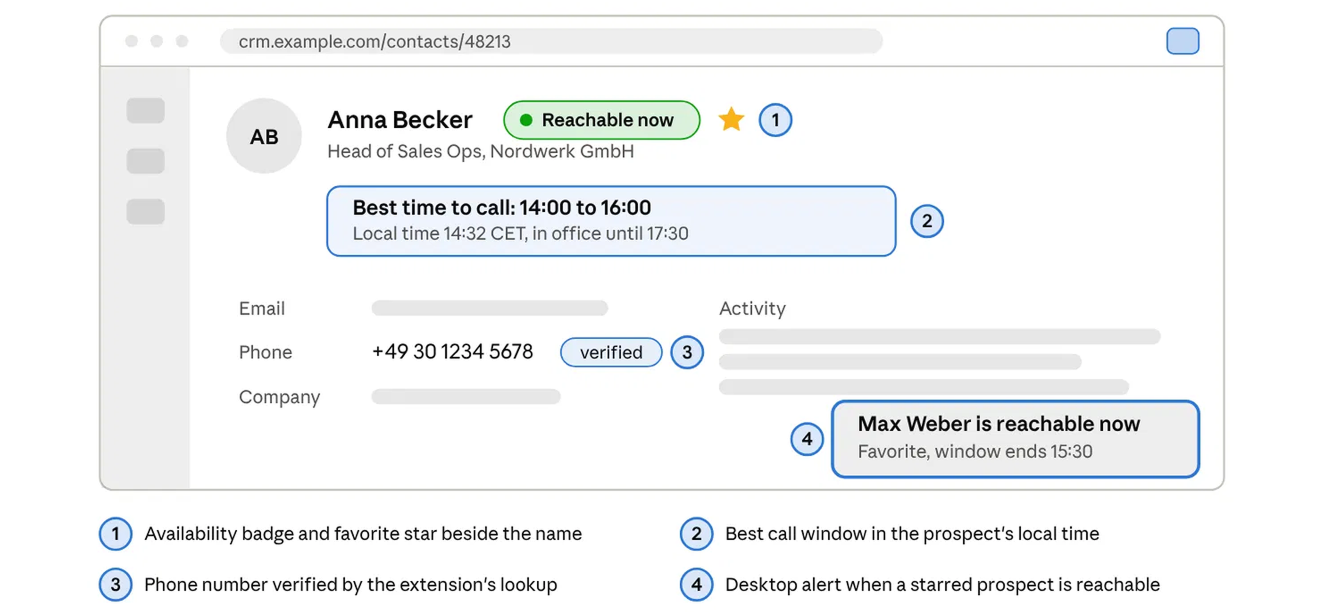
Instead of requiring representatives to open a separate dashboard before calling a prospect, the extension displayed availability badges and suggested calling times in the prospect's local time zone on supported CRM and LinkedIn pages. Saved-contact monitoring and desktop notifications helped representatives identify suitable calling opportunities as contact availability changed.
A modular site-adapter architecture separated platform-specific contact detection and badge placement from shared functionality: API communication, authentication, saved contacts, notifications, and user preferences. By separating site-specific integrations from shared functionality, the client could extend platform coverage without rebuilding the core application.
Core Application Capabilities
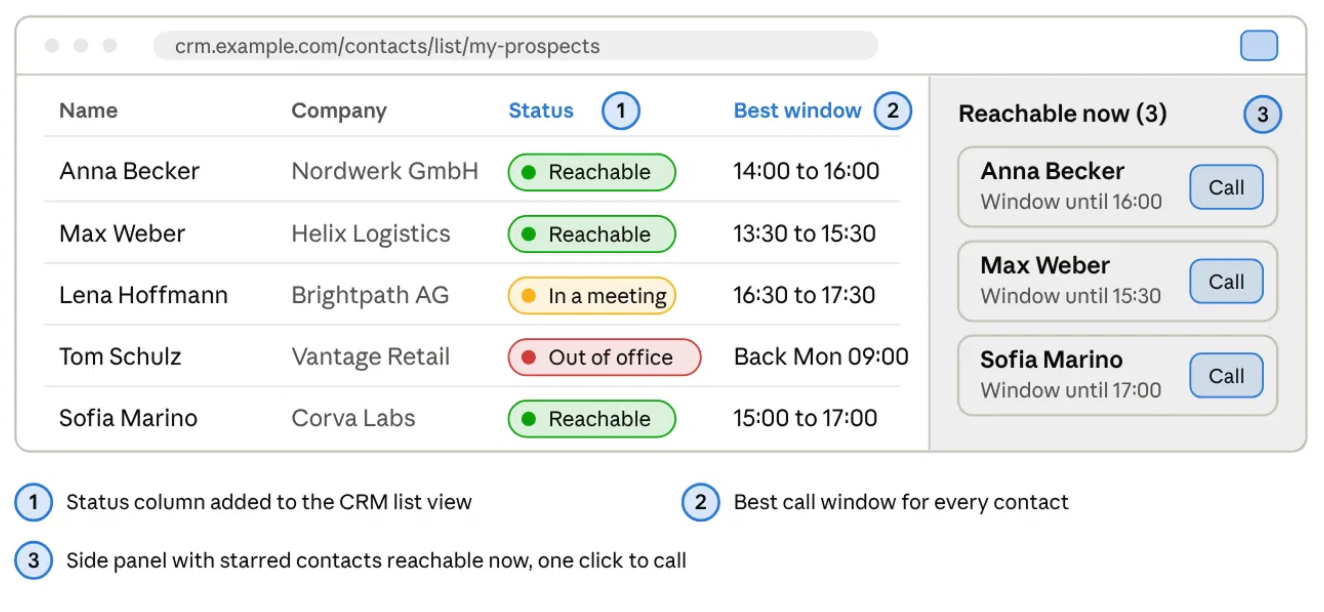
- In-CRM Availability Badges: Displayed green, amber, or red contact status indicators on HubSpot, Salesforce, and LinkedIn, along with recommended calling windows and local time information.
- Out-of-Office Detection: Displayed when a prospect was away and when they were expected to return, helping representatives avoid unproductive calls.
- Saved Prospects and Real-Time Alerts: Allowed representatives to favorite contacts and receive desktop notifications when a saved prospect became reachable.
- Reachable Now Panel: Provided a sortable shortlist of saved contacts who were available for immediate calls through the browser toolbar.
- Contact Lookup: Retrieved phone numbers using a contact's name, email address, or LinkedIn profile URL and provided click-to-call functionality.
- Secure Authentication: Integrated OAuth 2.0 sign-in through the client's identity provider, with token storage and automatic refresh.
- User Preferences: Supported configurable working hours and notification settings.
- English and German Localization: Provided a localized interface for users working in either language.
- Modular Site Adapters: Isolated contact detection and badge placement for each supported website, simplifying future CRM integrations.
- Cross-Browser Distribution: Supported Google Chrome and Microsoft Edge through a shared codebase built for Manifest V3, following our Chrome extension development practices.
Screenshots
User Workflow
- Open a Contact Page: The representative opened a contact record in HubSpot or Salesforce, or a prospect profile on LinkedIn, and the site adapter identified the contact.
- Retrieve Reachability Status: The extension requested the corresponding information from the client's API.
- Display Availability: A colored badge appeared beside the contact's name, with a suggested calling window and local time information.
- Save and Monitor a Prospect: The representative added a contact to favorites, and a background worker periodically checked it for reachability changes.
- Receive a Notification: When a saved prospect became reachable, the extension displayed a desktop notification.
- Review and Call: The representative opened the toolbar panel to view contacts available for immediate calls or looked up a phone number by name, email, or LinkedIn profile URL to start a call.
Technology Stack
To integrate the client's reachability engine with CRM platforms and deliver a secure, cross-browser extension, we used the following technical components:
Platforms
- Google Chrome
- Microsoft Edge
Extension Architecture
- Manifest V3
- Browser extension APIs
- Extension service worker
Frontend
- JavaScript
- HTML
- CSS
Website Integration
- Site-specific adapters
- On-page contact detection
- Dynamic badge injection
CRM Integrations
- HubSpot
- Salesforce
Professional Network Integration
Backend Integration
- Client reachability API
- Contact lookup API
Authentication
- OAuth 2.0
- Identity provider integration
- Token storage
- Automatic token refresh
Notifications
- Browser desktop notifications
- Background reachability checks
User Interface
- In-page availability badges
- Toolbar popup
- Sortable reachable-contact panel
- Settings interface
Localization
- English
- German
Privacy and Compliance
- The extension stores only saved contact IDs and user settings locally
- Contact data is requested from the client's API on demand
Distribution
- Chrome Web Store
- Microsoft Edge Add-ons
Results
The project transformed the client's backend-only reachability service into a production-ready CRM browser extension that brought prospect availability insights directly into sales representatives' daily workflows.
The extension was delivered in approximately four weeks, with a working build demonstrated to early customers at the end of each week. A single codebase supported both Chrome and Edge, while the modular integration architecture established a foundation for expanding platform coverage.
The main results included:
- 120 development hours to deliver the extension
- 4 weeks from kickoff to publication in both stores
- Two browser stores: Chrome Web Store and Microsoft Edge Add-ons
- Three supported platforms at launch: HubSpot, Salesforce, and LinkedIn
- Weekly customer demonstrations throughout development
- Extensible integration architecture prepared for potential support of Pipedrive, Microsoft Dynamics, Close, and other platforms
Core Team
- Frontend / Browser Extension Developer: Implemented the Manifest V3 architecture, website adapters, in-page availability badges, toolbar interface, and user settings
- Backend Integration Developer: Integrated the client's reachability and contact lookup APIs and implemented authentication flows
- QA Engineer: Verified contact detection, reachability display, notification behavior, authentication, and cross-browser functionality
- Project Manager: Coordinated development, prioritized features, and organized weekly demonstrations for early customers
Related Cases
- JavaScript
- Salesforce1
- API
- React
- PWA